Keep your rankings when URLs change
Sooner or later you will rename a page, restructure a section, or retire an old post. Done carelessly, that throws away the ranking and the backlinks the old URL earned, and sends visitors to a dead page. Done right, it costs you nothing. BeeRanked makes "done right" the default.
Why a moved URL matters
When a URL changes and the old one just disappears, two bad things happen: anyone who clicks an old link (from Google, another site, or a social post) hits a 404, and the authority that URL built up is lost instead of passed on. A redirect fixes both. It forwards the old address to the new one and carries the ranking signal across.
A quick example. Say /blog/our-2023-guide becomes /blog/the-complete-guide. Without a redirect, every Google result and backlink still pointing at the old path now lands on a 404, and months of accumulated authority evaporate. With a 301 in place, those clicks and that authority flow straight to the new URL, and visitors never notice the change.
BeeRanked handles most of this for you
When you change a page's slug inside BeeRanked, we create the redirect automatically and update your internal links and sitemaps in the same move. The old URL keeps working and points at the new one, your in-content links are rewritten to the new path, and the sitemap reflects the current URL. You usually do not have to think about it at all.
The Redirects manager
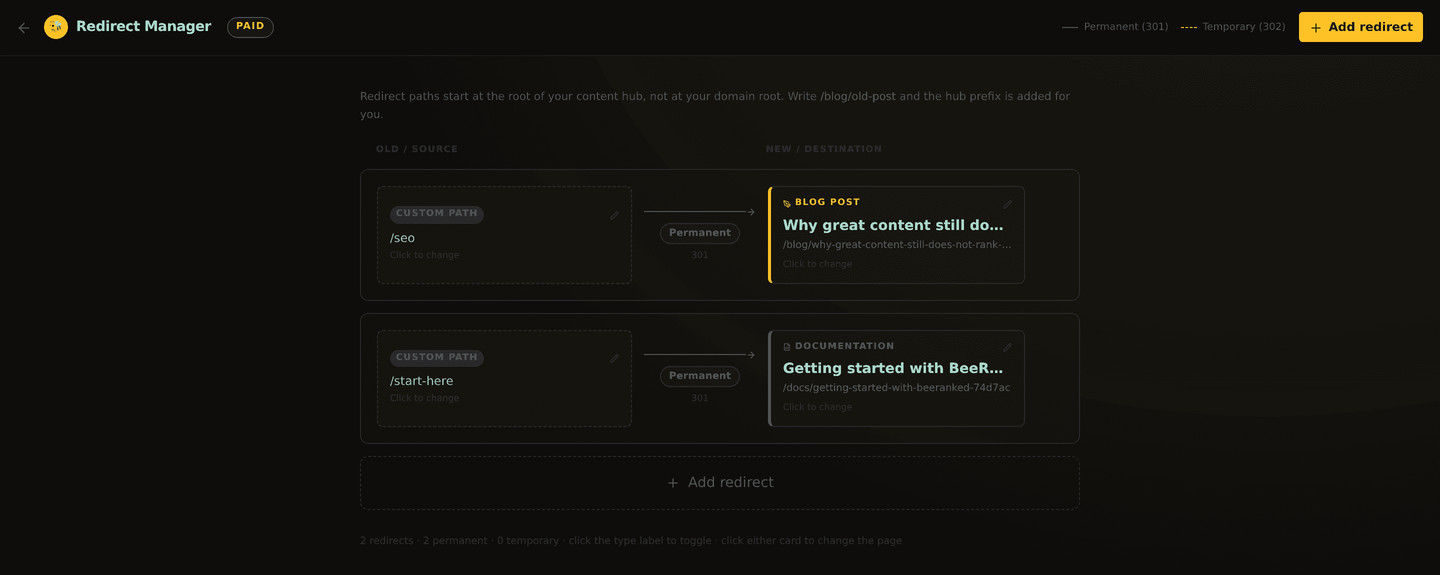
For everything else, an old URL from a previous site, a page you are retiring, a campaign link you want to repoint, open Redirects. It is a simple, visual list: each row shows the old path on the left and where it goes on the right, by page title. Add one by picking the old URL and the destination. This is also how you preserve rankings when you migrate an existing site onto BeeRanked: map each old address to its new home before you switch over.
Permanent vs temporary
A permanent (301) redirect says "this moved for good." It passes the ranking signal to the new URL. Use it for renamed or retired pages, which is almost every time.
A temporary (302) redirect says "this is a short detour." The original is expected back, so search engines keep the old URL indexed. Use it only for temporary moves, like a maintenance page or a seasonal campaign.
Reaching for a 302 when you mean 301 is the most common mistake; it withholds the ranking transfer. When in doubt, it is a 301.
Sitemaps stay in sync
Whenever you publish, BeeRanked regenerates your sitemaps, so search engines see your current URLs and the redirects guiding them. Nothing to update by hand. This works hand in hand with how BeeRanked keeps internal links from breaking when pages move.
Change URLs freely. Inside BeeRanked it is automatic, and for everything else the Redirects manager keeps your visitors and your rankings intact. When you are planning your URL structure up front, getting your content live covers where those URLs sit.
Want to try this on your own site?
Everything in this guide runs from one studio: connect your domain, publish, and the SEO side is done for you.