How to build a BeeRanked plugin
A plugin is how you make your BeeRanked content hub look and feel like your brand. This guide walks you through building one from scratch, using the same techniques we used to build our own honeycomb theme. By the end you will be able to recreate it, and then design your own.
What a plugin is
A BeeRanked plugin is declarative data. It carries three things:
Custom CSS that restyles the rendered hub.
Head HTML for things that belong in the page head, like a font import or a meta tag.
Slots, small pieces of markup injected at fixed points in the layout.
A plugin never runs arbitrary JavaScript. Scripts, inline event handlers, and dangerous URLs are stripped out before anything reaches a visitor. This keeps plugins safe to write, safe to share, and impossible to use for tracking or attacks. The trade-off is that a plugin styles and decorates the site; it does not add interactive behaviour.
Theme through tokens
The rendered hub is built on a layer of CSS variables called design tokens. Almost every colour, shadow, radius, and font on the site reads from a token. If you set the tokens, the whole site changes in a coordinated way, and it keeps working no matter how the underlying components are built.
The most important idea in this guide: prefer changing tokens over targeting individual elements. Tokens are the supported way to theme the hub.
Here are the tokens you will use most often:
--bgthe main page background.--bg-warma slightly warmer background, used by the footer and some surfaces.--bg-muteda muted background for hover states and subtle fills.--textthe main text colour.--text-mutedsecondary, lower-emphasis text.--borderthe main border colour.--border-lighta softer border for dividers.--brandyour primary brand colour, used for accents and buttons.--brand-mida darker, readable version of the brand colour for link text on light backgrounds.--brand-lighta pale tint of the brand colour.--on-brandthe text colour that sits on top of a brand-coloured surface.--radiusand--radius-lgcorner rounding, small and large.--shadow-sm,--shadow-md,--shadow-lgthe three shadow depths.--fontthe body font.--display-fontthe heading font. Set this to give every headline and the nav wordmark a distinct typeface.
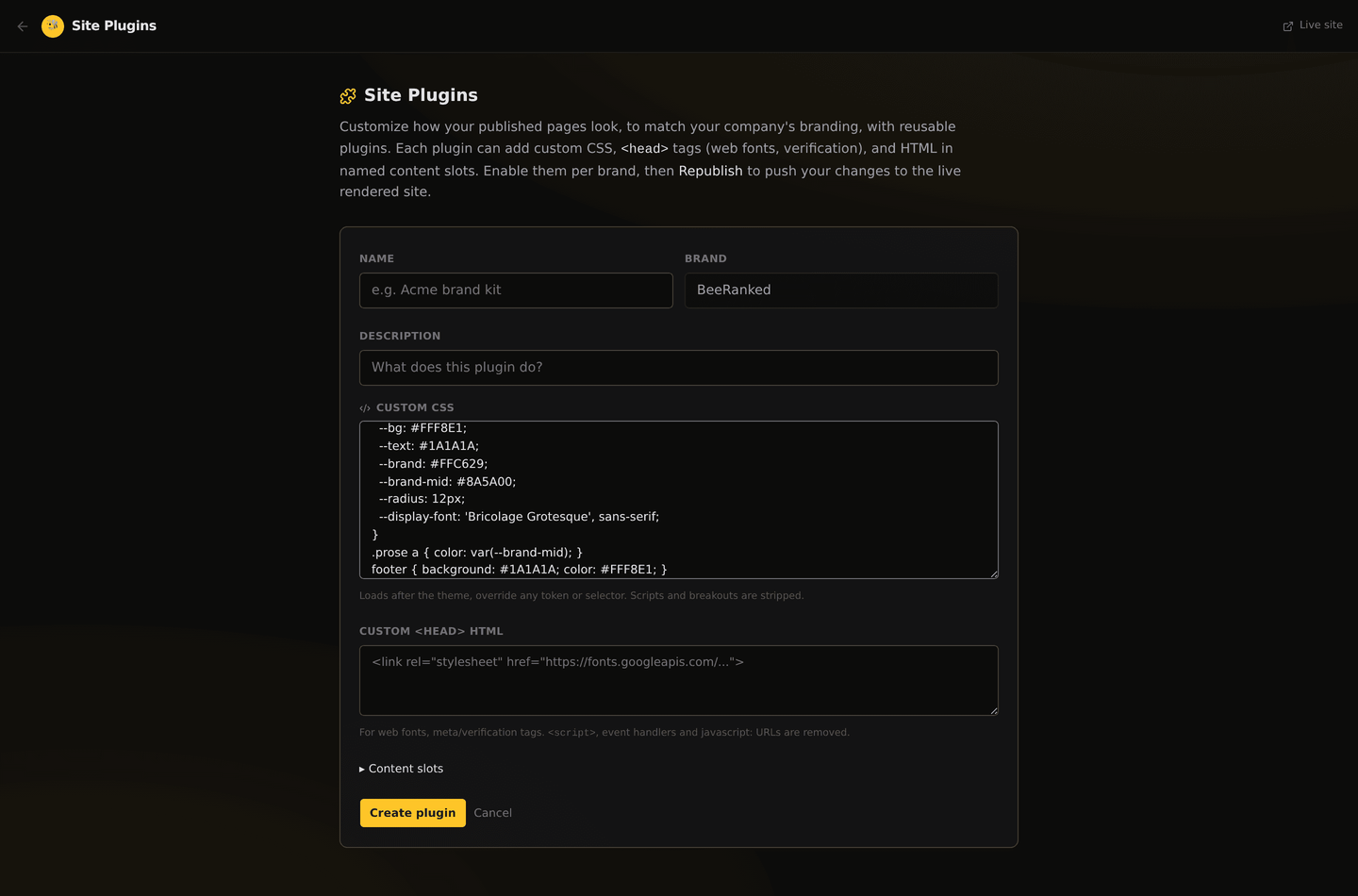
To set tokens, write a :root block in your custom CSS:
:root {
  --bg: #FFF8E1;
  --text: #1A1A1A;
  --brand: #FFC629;
  --brand-mid: #8A5A00;
  --radius: 12px;
  --shadow-md: 5px 5px 0 #1A1A1A;
  --display-font: 'Bricolage Grotesque', sans-serif;
}
Because the components read these variables, that small block already restyles the entire hub: background, text, accents, buttons, shadows, and corners, all at once.
Loading a custom font
If your brand uses a specific typeface, declare it with an @font-face rule and point --display-font (or --font) at it. Host the font file on your own domain so there are no cross-origin issues:
@font-face {
  font-family: 'Bricolage Grotesque';
  font-style: normal;
  font-weight: 200 800;
  font-display: swap;
  src: url('https://yourbrand.com/fonts/bricolage.woff2') format('woff2');
}
Then --display-font: 'Bricolage Grotesque', sans-serif; applies it to every heading and the wordmark through one global rule the renderer already ships.
The five slots
Slots let you inject your own markup at fixed points in the layout. They are:
banner appears above the navigation bar. Good for an announcement strip.
header_end appears inside the nav, after your links. Good for a call-to-action button.
before_content appears just above the page content.
after_content appears just below the page content. Good for a newsletter prompt or related links.
footer appears in the footer area.
Slot markup goes through the same safety filter as head HTML: styling and structural markup are kept, scripts and event handlers are removed. Empty slots collapse to nothing, so you only pay for what you use.
What is allowed and what is removed
To keep every site safe, the plugin system sanitises your input:
Removed:
<script>tags, inlineon*event handlers (likeonclick), and dangerous URLs (javascript:,vbscript:, anddata:text/html).Removed in CSS: attempts to break out of the style block, plus
expression(andbehavior:.Kept: your CSS,
<link>,<meta>,<style>, and ordinary HTML markup, because branding needs them.
Write your plugin as styling and content only, and you will never hit the filter.
A worked example, the honeycomb look
Here is how our own theme is built, top to bottom. Use it as a template and swap in your own values.
1. Set the palette through tokens
A cream paper background, near-black ink for text, and a honey accent, with hard offset shadows and slightly rounded corners:
:root {
  --bg: #FFF8E1;
  --bg-warm: #FBEFC8;
  --bg-muted: #F3E9C8;
  --border: #1A1A1A;
  --border-light: #E4D9B4;
  --text: #1A1A1A;
  --text-muted: #5C5640;
  --brand: #FFC629;
  --brand-mid: #8A5A00;
  --brand-light: #FFEFB8;
  --on-brand: #1A1A1A;
  --radius: 12px;
  --shadow-md: 5px 5px 0 #1A1A1A;
}
2. Add a subtle background texture
A faint hexagon pattern, drawn as an inline SVG so there is no extra request:
body {
  background-color: var(--bg);
  background-image: url("data:image/svg+xml,%3Csvg xmlns='http://www.w3.org/2000/svg' width='56' height='96'%3E%3Cg fill='none' stroke='%231a1a1a' stroke-opacity='0.05' stroke-width='1.4'%3E%3Cpath d='M28 0l24 14v28L28 56 4 42V14z'/%3E%3C/g%3E%3C/svg%3E");
}
Keep textures faint. A heavy pattern fights your content for attention.
3. Give the footer a dark bookend
footer {
  background: #1A1A1A;
  color: #FFF8E1;
  border-top: 4px solid var(--brand);
}
.footer-inner, .footer-inner a, .footer-brand { color: #EDE6CF; }
4. Style the article body
The article content lives under the .prose class, so you can give it editorial polish: accented links and a styled section divider.
.prose a { color: var(--brand-mid); text-decoration-color: var(--brand); }
.prose h2 { border-bottom: 2px solid var(--brand-light); padding-bottom: 0.3rem; }
That is the entire theme: tokens for the system, a texture, a footer, and some prose polish. Every line is reproducible with nothing but the plugin fields.
One limit
Plugin CSS loads after the renderer's own styles, so it can override almost everything: the nav, footer, article body, buttons, and all the tokens.
The exception is the homepage hero and the cards on it. Those are scoped page components, and for technical reasons they can only be restyled through tokens (their colours, shadows, radius, and --display-font), not by targeting their classes to change size or layout. In practice this means: set your palette and fonts and the homepage will follow, while bespoke homepage composition is a platform feature. For the vast majority of branding, tokens are more than enough.
Applying your plugin
Go to the Plugins page in your dashboard and create a plugin for your brand.
Paste your custom CSS, add any head HTML, and fill in the slots you want.
Toggle the plugin on.
Click Republish. Because your hub is served from fast static snapshots, brand-wide changes like a new plugin need a republish to re-render your pages. You will see the progress as it renders, then your live site reflects the new look.
Tips for a great plugin
Start with tokens, finish with details. Get the palette and fonts right first; the whole site moves with them.
Respect contrast. Make sure text stays readable on your backgrounds, especially link colours on light surfaces. That is why we keep a separate, darker
--brand-midfor text.Keep textures and shadows light. They should support the content.
Reuse tokens inside your own rules. Writing
var(--brand)instead of a hard-coded colour keeps your plugin consistent and easy to retheme later.Test on a real article and the homepage before you publish, so you see both the prose styling and the token-driven hero.
With tokens, slots, and a little CSS, you can make your BeeRanked hub look like nothing else. Start from this example, then make it yours.
Want to try this on your own site?
Everything in this guide runs from one studio: connect your domain, publish, and the SEO side is done for you.