Move your Medium blog to your own domain
By BeeRanked · October 29, 2026
Medium is a good place to be read and a hard place to build on. Your stories sit on medium.com, or on a custom domain that Medium controls, and the page itself stays Medium's. Medium documents its custom domains, its exports and what leaving involves, and the move to a blog on your own site keeps the dates and images intact. Every Medium quote comes from help.medium.com, read in September 2026.
What a custom domain on Medium gives you
Medium lets you put a profile or a publication on your own domain, on two conditions. You need "an active Medium membership subscription", which the help centre prices at "$5/month or $50/year", and the domain has to be "a top-level domain name like yourdomain.com or a subdomain like blog.yourdomain.com": "you cannot connect a custom URL that's a subdirectory (folder), for example yourdomain.com/blog". The setup is two A records, "Proxies must be disabled", and "This process can take up to three days".
Once connected, "your old URLs will start automatically redirecting to your custom domain URL". What does not change is the page: "Medium does not support Google Analytics, and there's no way to add any kind of code to your page." A custom domain gives you the address and leaves you Medium's page as it is, with no analytics of your own, no code, and no place under a path of your main site.
What you can take with you
Medium's export covers the writing: "Medium gives you the ability to export your personal data and stories as HTML files in a .zip archive", from Settings, then Security and apps, then Download your information. The feeds are the other door. Medium "provides RSS feeds for user profiles, publications, and topic pages", at medium.com/feed/@username for a profile and medium.com/feed/[publication-name] for a publication. One limit applies to Partner Program writers: eligible stories "are placed behind the paywall", and "Stories behind the Medium paywall are not available as full stories in any RSS feeds".
What Medium does not offer is a redirect to another site. The help centre documents redirects from old Medium URLs to a new subdomain or custom domain, and nothing pointing away from Medium. The closest tool is the canonical link: in a story's More settings, "select This story was originally published elsewhere. Enter your link and click Save canonical link."
Moving the stories to your own site
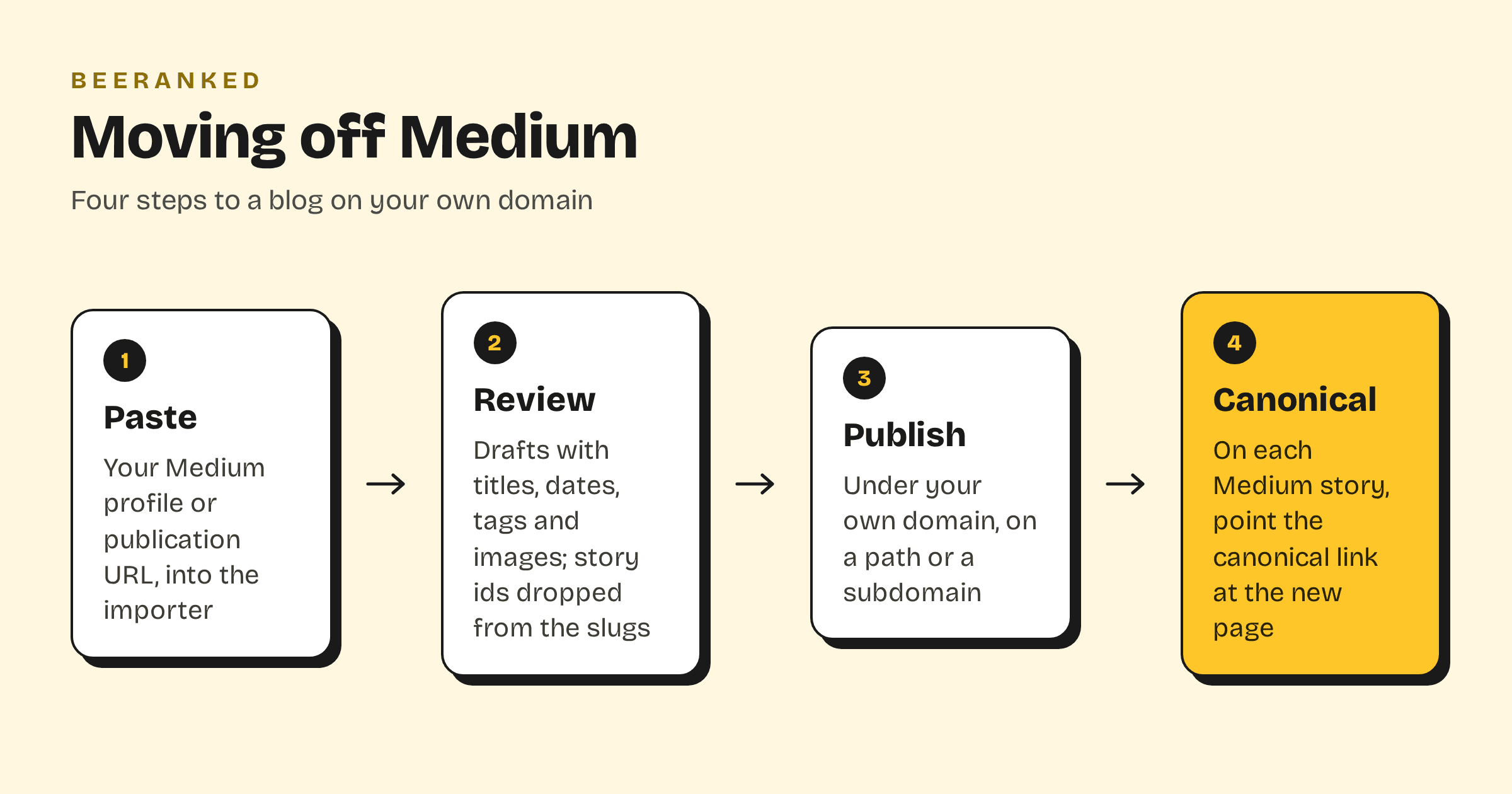
Paste your profile or publication URL into the BeeRanked importer. Medium answers page requests from tools with a block page, so the importer reads the feed instead, which carries the full text of each open story, and pulls the title, body, date, author, tags and images. The feed lists your latest stories, ten in the feeds we tested. Older stories are in the export archive as HTML files; the importer does not read that archive yet, so for a long back catalogue plan on copying those by hand, or ask us to do it.
Review the drafts. Titles and dates come across as they were, and the story id that Medium appends to every URL is dropped from the new slug, so a story at medium.com/@you/why-we-moved-0126fa5c6ce8 becomes yoursite.com/blog/why-we-moved.
Publish under your own domain: on a path such as yoursite.com/blog through a reverse proxy, or on a subdomain with one DNS record. Subdomain or subfolder for your blog has the trade-off, and How to add a blog to the website you already have the wider picture.
On each Medium story, set the canonical link to the new page. A canonical URL tells search engines which copy is the original, and from then on that is your site.
Should you keep publishing on Medium?
Yes, if Medium brings you readers. Write on your own site first, then bring the story to Medium with its import tool, which "will automatically backdate the post to the original date, as well as add a canonical link to make sure your SEO won't be penalized". Your site holds the original and earns the search traffic; Medium holds a copy and shows it to its members. That is what Medium's own tool is built for.
The importer run, 23 articles pulled out of a blog in six seconds, is shown in Move a blog with one address.